AI Headshot Generator: Zuno1.1
Publisher Description

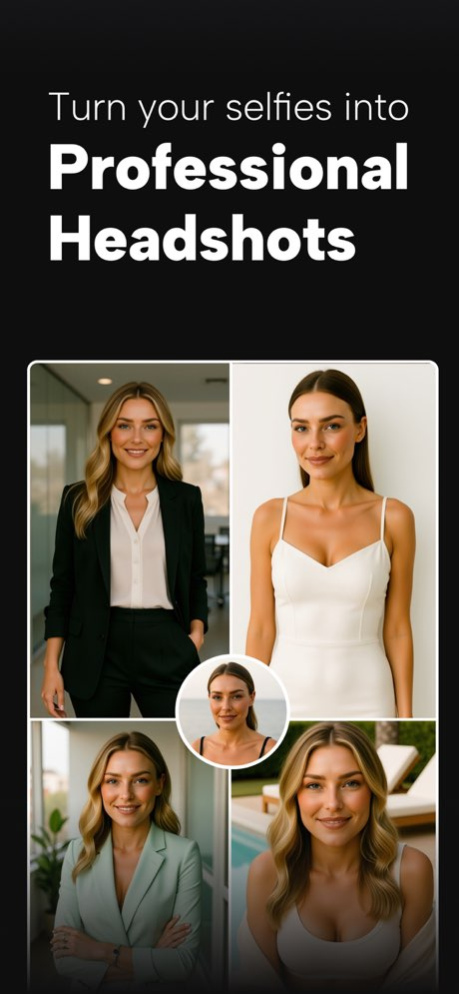


Zuno AI gives you studio-grade business portraits without booking a photographer. Simply upload your selfies, train a personal face model, and generate professional headshots that look like they were shot in a real studio.
Whether you need a polished LinkedIn photo, corporate portrait, or a clean resume-style image, or looking for anything casual, party-style Zuno does it all!
Why Zuno?
Well, unlike most of the headshot generators that use Face-swapping models to just swap your face into an already shot picture, Zuno’s approach includes training a model of your face from 7-8 face selfies/shots. Once you’ve uploaded, we train your face model which is then used to generate headshots in different packs.
The outcome: Stunning studio-grade headshots that beat pictures taken by a professional photographer! We’ve tried and tested our headshot generator ourselves in order to make the headshots more stunning and post-worthy!
How does it work?
Start by subscribing and training your face model using your own photos. Once your model is ready, you can explore 200+ expertly crafted headshot packs. Each pack contains 8-10 premium portrait styles, including modern office looks, formal corporate shoots, executive backdrops, outdoor bokeh portraits, startup-style creative shots, and more.
Tap a pack, choose your trained face model, and instantly generate the full set - every image matched perfectly to your identity.
Prefer full creative control? Zuno also includes prompt-based headshot generation. Write your own style prompt, select your trained face model, and produce custom portraits that reflect exactly the look you want - from executive boardroom shots to cinematic corporate close-ups. Your personalized model ensures the output always looks like you.
Zuno is built for anyone who wants fast, reliable, studio-grade photos:
・Job seekers polishing their LinkedIn
・Professionals upgrading their corporate identity
・Creators and founders building personal brands
・Teams standardizing profile photos without scheduling a shoot
Every generation is delivered in crisp detail with natural lighting, accurate facial structure, and backgrounds you’d expect from a high-end photoshoot. You can save, share, and reuse your trained models anytime.
With AI-powered consistency, premium styling, and unlimited creative control, Zuno makes it effortless to present your best, most professional self - whenever you need it.
What are you waiting for? Download Zuno now! Create headshots that actually stand out!
Privacy Policy: https://sites.google.com/view/zuno-app/privacy-policy
Terms & Conditions: https://sites.google.com/view/zuno-app/terms-conditions
Support: https://sites.google.com/view/zuno-app/support
Version History Welcome to Zuno v1.1. We've added new packs and optimized our engine for beautiful headshots. Stunning headshots are waiting for you, try the new packs now! 1.1 12/16/2025 1.0 11/27/2025
About AI Headshot Generator: Zuno
The company that develops AI Headshot Generator: Zuno is Vishal Makwana. The latest version released by its developer is 1.1.
To install AI Headshot Generator: Zuno on your iOS device, just click the green Continue To App button above to start the installation process. The app is listed on our website since 2026-09-19 and was downloaded 0 times. We have already checked if the download link is safe, however for your own protection we recommend that you scan the downloaded app with your antivirus. Your antivirus may detect the AI Headshot Generator: Zuno as malware if the download link is broken.
How to install AI Headshot Generator: Zuno on your iOS device:
- Click on the Continue To App button on our website. This will redirect you to the App Store.
- Once the AI Headshot Generator: Zuno is shown in the iTunes listing of your iOS device, you can start its download and installation. Tap on the GET button to the right of the app to start downloading it.
- If you are not logged-in the iOS appstore app, you'll be prompted for your your Apple ID and/or password.
- After AI Headshot Generator: Zuno is downloaded, you'll see an INSTALL button to the right. Tap on it to start the actual installation of the iOS app.
- Once installation is finished you can tap on the OPEN button to start it. Its icon will also be added to your device home screen.
Program Details
System requirements
Download information
Pricing
Version History
version 1.1
posted on 2026-09-19
Version History Welcome to Zuno v1.1. We've added new packs and optimized our engine for beautiful headshots. Stunning headshots are waiting for you, try the new packs now! 1.1 12/16/2025 1.0 11/27/2025
